Find places and addresses on the map
On this page
The search box at the top of every Maps page finds a city, a street address, a business or a landmark, and also kinds of places: type coffee and Maps lists the coffee shops in the area you are looking at.
#Search for a place or an address
-
Select the search box (or press / anywhere on a Maps page) and start typing.
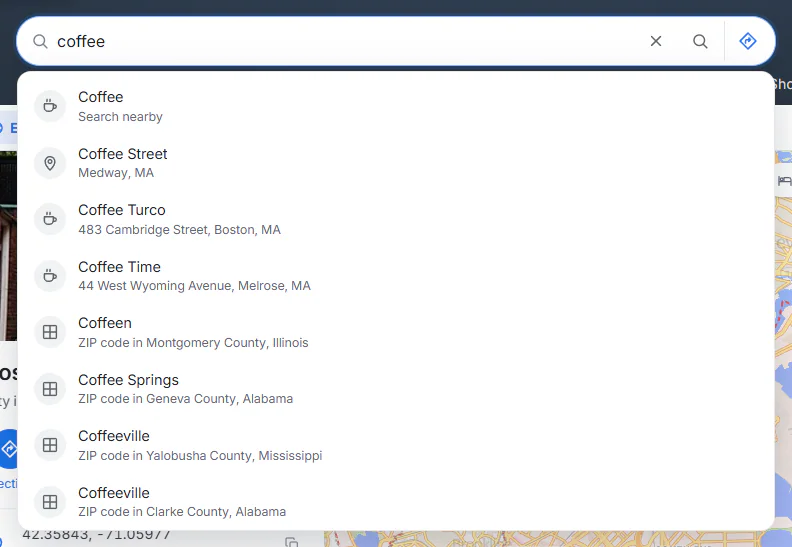
Suggestions appear after two letters. A kind of place comes first; places nearer the middle of the map rank higher.
- 1Type a place, an address or a kind of place
- 2A kind of place: select to search the map in view
- 3A place or address that matches
-
Pick a suggestion with the mouse, or with ↓ and Enter. Or press Enter to search for exactly what you typed.
-
Maps opens the answer. What you get depends on what you typed:
- A city, a town or a U.S. ZIP code (
boston,90210) opens its page, with its outline on the map. - A U.S. state or a country (
texas,france) opens its page. - An address or a landmark with one clear match (
boston public library,fenway park) opens that place's page, with a red pin. - Anything with several matches shows a numbered list, "N places match"; select the one you mean.
- Coordinates (
42.3601, -71.0589) or a plus code (87JC9W5R+93) drop a pin on that exact spot.
- A city, a town or a U.S. ZIP code (
Searching for a type of map works too: satellite map, bike map or earthquakes opens that map's page, and data centers in virginia opens the data center map for Virginia. See Types of map.
#Search for a kind of place
Type what you are looking for, with or without a place: coffee, gas stations, hotels near denver, pharmacy open now. Maps knows more than sixty kinds of places, from restaurants, groceries and EV charging to dentists, trailheads, playgrounds and ferry terminals.
You can also select one of the buttons over the map (Restaurants, Coffee, Gas, Groceries, Hotels, Things to do, Parks, Pharmacies, EV charging, ATMs, Hospitals, Bars); on the Maps home the same buttons are in the panel.
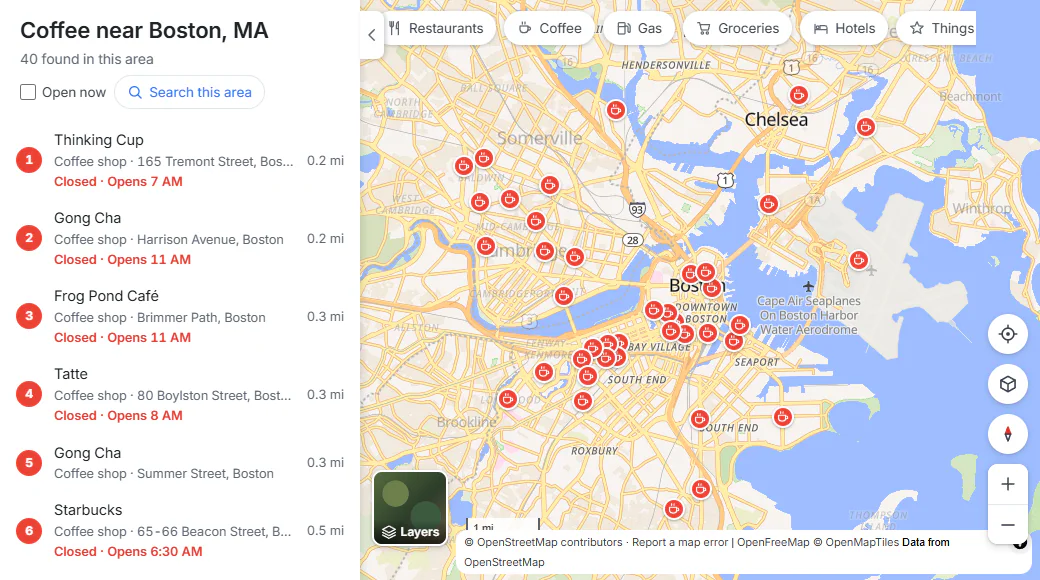
Coffee near Boston: a numbered list, nearest the middle first, and the same numbers on the map.
- 1What you searched for, and where
- 2Open now hides places that are closed
- 3Search this area, after you move the map
- 4A result: name, kind of place and distance
- 5The same result on the map
- Without a place name, Maps searches the part of the map you can see. With one (
coffee near cambridge), it searches around that place. - A kind-of-place search covers a neighborhood or a small city, never a whole region: it is about what is near. Zoom in to where you want results.
- Each result shows its name, what kind of place it is, its street, the distance from the middle of the search area and, when the map knows its hours, whether it is open: Open · Closes 9 PM, Closes soon, or Closed · Opens 7 AM.
- Point at a result to highlight its pin; select it to open the place page.
#Open now
Tick Open now to hide every place that is not open at this moment, by the place's own local time. Places whose hours are not on the map are hidden too, because Maps cannot tell. Adding open now to your search ticks the box for you.
#Search this area
After a kind-of-place search, the results stay where they were found. Move or zoom the map and a Search this area button appears at the top of the map; select it (or the button of the same name in the panel) to look again where you are now.
#Places on the map itself
The map labels towns, parks, shops, stations and many other places. Select a label and Maps opens that place's page. When the pointer turns into a hand, there is something to select.
To find out what is at any other spot, right-click it (or press and hold on a touch screen) and choose What's here?. See Place pages.
#Recent searches
With Saved preferences allowed, Maps remembers your last searches in this browser. Select the empty search box to see them, marked Recent search. See Save places.
#Maps from the main search box
You do not have to open Maps first. A search in the site's ordinary search box that asks for a map or a route shows a Maps card above the results on the All tab.
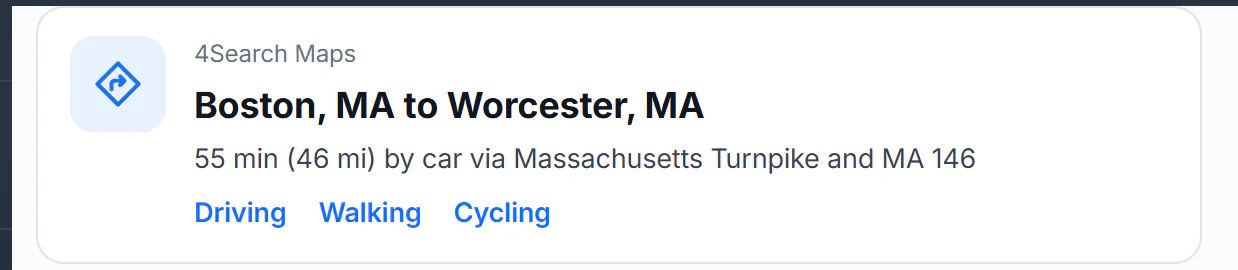
The card for directions from Boston to Worcester shows the driving time and opens the route in Maps.
- 1Select the title to open the route in Maps
- 2Driving time and distance, from the same routes Maps uses
- 3Choose how to travel
| You search | The card offers |
|---|---|
boston map, map of france | The city, state or country, with links such as Map, Satellite and, for a city, Directions and nearby Restaurants and Hotels |
where is fenway park | Search the map for it, and Directions |
directions from boston to worcester | The driving time and distance, and Driving, Walking and Cycling links |
earthquake map, satellite view, bike map | That type of map |
data center map | The data center map |
#Common questions
Why does my search for "pizza" find nothing?
A kind-of-place search looks only in the area on the map. If you are zoomed out over a whole state, or the map shows the open sea, there may be nothing in view, and the panel says so. Zoom in on a town, or add a place: pizza near providence.
Why are some well-known businesses missing?
The map comes from OpenStreetMap, which volunteers keep up. A place that nobody has added, or added without its category, will not show up in a kind-of-place search. Try searching for it by name, and consider adding it to OpenStreetMap.
What is a plus code?
A short code, such as 87JC9W5R+93, for a spot about 14 meters across, free to use anywhere in the world. Every place page shows one, with a button to copy it. People use them where streets have no addresses.
The list says a place is closed, but it is open. Why?
Opening hours come from OpenStreetMap and may be out of date. Check the place's own website or call before you go; both are on its page when the map has them.